
Windows 11 November 2026 Update: Release Date, Features & How to Install
Windows 11 November 2026 Update: Release Date, Features & How to Install
Microsoft continues to improve Windows 11 with regular security updates, performance improvements, and new features. The Windows 11 November 2026 Update is the next scheduled monthly update, bringing another round of maintenance and security improvements for supported devices.
Unlike a major Windows feature release, Microsoft's November update is listed in its update schedule as a hotpatch update for Windows 11 versions 26H2 and 25H2. This technology allows eligible devices to receive certain security updates without requiring a system restart.
In this guide, we'll explain the November 2026 update schedule, what hotpatch technology means, what users should expect, supported Windows versions, and how to check for and install the latest updates.
Windows 11 November 2026 Update: Release Date
Microsoft generally releases monthly Windows security updates on the second Tuesday of each month. For November 2026, that date falls on November 10, 2026.
According to Microsoft's Windows release information, the November update is scheduled as a hotpatch release for Windows 11 versions 26H2 and 25H2.
Microsoft's hotpatch calendar currently lists the November update without a confirmed build number or KB article. Therefore, users should check Windows Update and Microsoft's official release history for the latest availability information.
- Expected release date: November 10, 2026
- Update type: Scheduled monthly hotpatch
- Windows 11 versions: 26H2 and 25H2
- KB number: Not announced as of November 9, 2026
- Build number: Not announced
You can follow Microsoft's official Windows 11 release information page for confirmed update details.
What Is New in the Windows 11 November 2026 Update?
Microsoft has not published the complete November update changelog yet. However, the official update schedule identifies it as a hotpatch release rather than a new major Windows feature update.
Here is what users should understand about the update:
1. Hotpatch Technology

One of the important aspects of Microsoft's November update schedule is its use of hotpatch technology.
Hotpatching allows supported Windows devices to install certain security updates without restarting the computer. Instead of requiring a traditional restart after every update, hotpatch technology applies eligible security changes while Windows is running.
This can help reduce interruptions for users and organizations that need their computers available throughout the day.
However, hotpatch availability depends on device eligibility and configuration. Not every Windows 11 computer automatically receives hotpatch updates.
2. Security Improvements
Security is one of the main purposes of Microsoft's monthly Windows updates. The November release is scheduled as a security-focused hotpatch update.
These updates are designed to help protect supported Windows devices against security vulnerabilities. Microsoft publishes the specific vulnerabilities and fixes in its security and update documentation when the release becomes available.
Users should install applicable security updates to keep their systems protected.
3. Windows Stability and Maintenance
Monthly Windows updates also play an important role in maintaining system reliability.
Microsoft may include fixes for previously identified issues and other maintenance changes in its monthly servicing releases. However, the exact fixes included in the November 2026 update have not yet been confirmed.
We recommend checking the official release notes before assuming that a particular performance or stability issue has been fixed.
4. No Confirmed Major Feature Upgrade
It is important to understand that the November monthly update is not the same as the Windows 11 2026 feature update, also known as version 26H2.
Windows 11 version 26H2 was officially announced on September 29, 2026. It delivers the 2026 feature release through Microsoft's modern servicing technology.
The November update is part of the regular monthly servicing schedule, so users should not expect an entirely new Windows version simply by installing it.
Windows 11 26H2 vs November 2026 Update
Many users may confuse the Windows 11 2026 Update with the November monthly update. These are two different releases.
| Feature | Windows 11 26H2 | November 2026 Update |
|---|---|---|
| Update type | Annual feature update | Monthly hotpatch |
| Release date | September 29, 2026 | Scheduled for November 10, 2026 |
| Purpose | Feature and platform updates | Monthly security servicing |
| New Windows version | Yes | No |
| Restart requirement | Requires a restart to complete installation | Eligible hotpatch updates can install without a restart |
For more information, read Microsoft's official Windows 11 2026 Update announcement.
Which Windows 11 Versions Will Receive the November Update?
Microsoft's hotpatch calendar lists November 2026 hotpatch updates for the following Windows 11 versions:
- Windows 11 version 26H2: Included in the November hotpatch schedule.
- Windows 11 version 25H2: Included in the November hotpatch schedule.
- Windows 11 version 24H2: Its monthly servicing follows a separate update schedule and should be checked against Microsoft's release information.
Keep in mind that hotpatching has additional eligibility requirements. The update experience may differ depending on the Windows edition, device configuration, and management environment.
How to Download and Install the Windows 11 November 2026 Update
Once Microsoft makes the November update available for your device, you can check for it through Windows Update.
Follow these steps:
- Open the Start Menu on your Windows 11 computer.
- Click Settings.
- Select Windows Update from the left sidebar.
- Click Check for updates.
- Wait while Windows checks for available updates.
- If the November update is available, follow the on-screen instructions to install it.
- Allow Windows to complete the update process.
Tip: Keep your computer connected to the internet during the update process. If Windows requests a restart, save your work before restarting your PC.
How to Enable Automatic Windows Updates
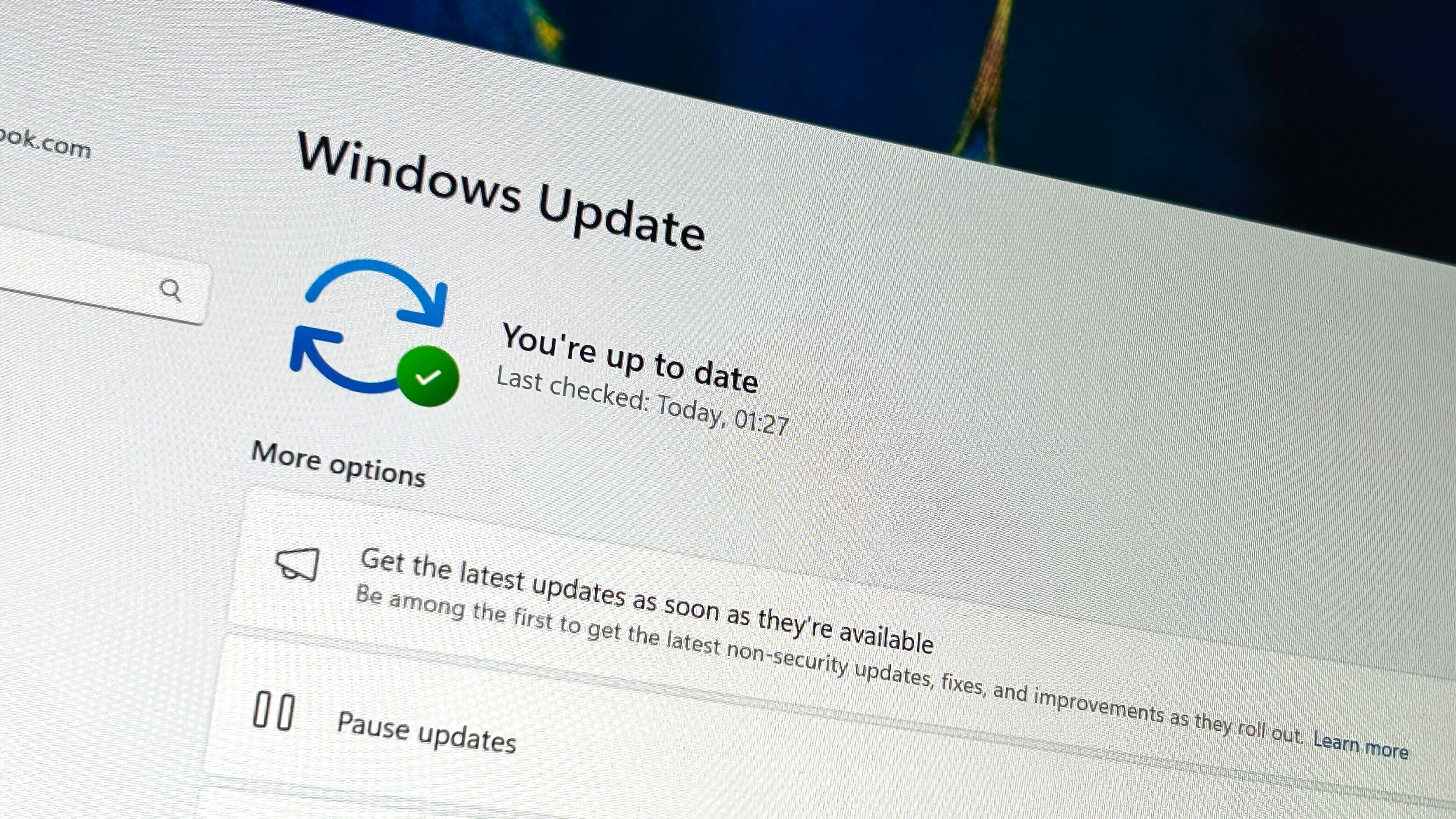
If you want Windows to receive the latest available updates as soon as they are offered, you can enable Microsoft's latest updates option.
- Open Settings.
- Navigate to Windows Update.
- Find the option Get the latest updates as soon as they're available.
- Turn the option on.
- Click Check for updates.
This setting helps eligible devices receive non-security updates and improvements earlier when Microsoft makes them available. It does not bypass compatibility restrictions or guarantee immediate access to every update.
Should You Install the November 2026 Windows Update?
Generally, installing applicable Windows security updates is recommended because they help protect your computer against known security vulnerabilities.
However, users should consider a few things before installing any major or monthly update:
- Save important documents and files before updating.
- Keep your laptop connected to its charger.
- Make sure you have a stable internet connection.
- Check Microsoft's release notes for known issues.
- Allow Windows to complete the installation without interrupting it.
For regular users, installing supported security updates is an important part of keeping Windows 11 secure and reliable.
Frequently Asked Questions (FAQs)
1. When will the Windows 11 November 2026 Update be released?
The update is scheduled for November 10, 2026, following Microsoft's regular second-Tuesday monthly update schedule. Its final availability and release details should be confirmed through Windows Update.
2. What is the KB number of the November 2026 update?
Microsoft has not published the November 2026 update's KB number as of November 9, 2026. Check the official Windows 11 release information page for the latest details.
3. Is the November 2026 update a major Windows 11 upgrade?
No. It is listed as a monthly hotpatch update. Windows 11 version 26H2 is the separate annual feature update released in September 2026.
4. Will the November update require a restart?
Eligible hotpatch updates can install without restarting the computer. However, this depends on device eligibility and update configuration. Other updates may still require a restart.
5. How can I check whether the update is installed?
Open Settings, navigate to Windows Update, and select Update history. You can review the installed updates and their KB numbers there.
6. Is Windows 11 26H2 available now?
Yes. Microsoft announced Windows 11 version 26H2 on September 29, 2026. It is available for eligible Windows 11 devices running versions 24H2 and 25H2.
Final Thoughts
The Windows 11 November 2026 Update is part of Microsoft's ongoing monthly servicing schedule. Its planned hotpatch release is particularly relevant for eligible devices because hotpatch technology can deliver certain security updates without requiring a restart.
Although the exact November changelog has not yet been published, users should keep their Windows installations updated and follow Microsoft's official release information for confirmed changes.
Frequently Asked Questions
Is this guide beginner friendly?
Yes. This tutorial is written step-by-step for beginners.
Does this work in 2026?
Yes. This article is updated regularly with latest changes.
Where can I learn more?
Browse more tutorials on LoopGuy.



Comments (0)
No comments yet. Be the first to comment!
Leave a Comment